

HARMAN PROFESSIONAL
BitterSweet Pro
Couldn't load pickup availability
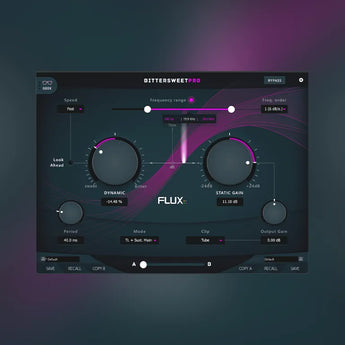
FLUX BitterSweet Pro, built around a new improved design of the algorithm found in Flux:: acclaimed freeware transient processor: BitterSweet. One of the main features of BitterSweet Pro is its ability to process only a certain part of the frequency spectrum, providing extended control of the transients processing and making it act like a dynamic equalizer driven by Transients and/or Sustain.
Features
Up to 8 channels Input/Output
Frequency Range sets the actual frequency range to be processed (20 Hz / 20,0 kHz – Lower / 40 Hz / 20,0 kHz – Upper). The frequency extraction can be audited with a simple button click.
Detector sidechain filtered in accordance with the frequency range setting and its low cut, high cut and band pass filter, the filtered sidechain extraction can be audited with a simple button click.
Speed, alters the mode for the processing of the transients, controlling the envelope smoothing and generating a natural attack (Fast/Medium/Slow).
Attack, Hold, Release, adjusting the attack, hold and release times for the transient processing.
Dynamic gain adjusting the gain of the transients and/or the sustain (-100,00% – Sweet / 100,00% – Bitter)
Static Gain controls the actual gain of the Frequency Range filter envelope ( -24.00 dB / +24.00 dB).
Output Gain -24.00 dB / +24.00 dB gain range (applied to the processing output before the soft clipper)
Geek pane (advanced settings) with an additional range of parameters providing extended control of the transient processing envelope.
Preset/Parameter slots
Parameter Morphing Slider with Automation
Preset manager
Video
[embed]https://www.youtube.com/watch?v=pIbugulkDBE[/embed]
System Requirements For FLUX BitterSweet Pro
OS Compatibility
- Windows 10 / 11 – 64bit only
- MacOS 10.14.6 Mojave and latest
Hardware Specification
- USB displays are not supported.
- Windows: A graphic card fully supporting OpenGL 2.0 is required. If your computer has an ATi or NVidia graphics card, please assure the latest graphic drivers from the ATi or NVidia website are installed.
- Mac OS X : Mac Pro 1.1 & Mac Pro 2.1 are not supported.
Software license requirements
In order to use the software, an iLok.com user account is required (the iLok USB Smart Key is not required). VS3 license not included in FLUX:: standard license. Additional VS3 license for Pyramix & Ovation Native/MassCore 32/64 bit versions available from Merging TechnologiesRecently viewed products
Describe your recently viewed products here


